
Who sees what in a sports club app
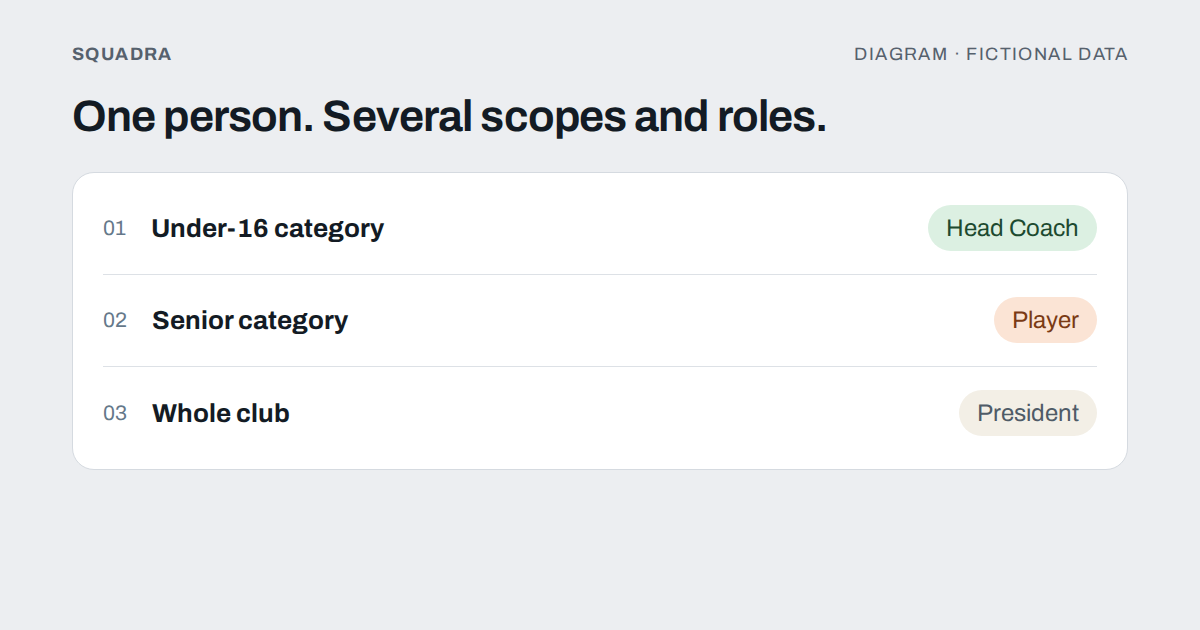
In a club almost nobody has a single role: the Under-16 coach plays for the seniors and the president has a child in the juniors. Permissions work by person and scope, not by title.
The first question a club asks when it sets up anything shared, whether an app, a folder or a spreadsheet, tends to be «who can see what?». And the typical answer is a list of titles: the president sees everything, coaches see their own team, players see their own stuff.
That works until the first real case arrives. The Under-16 coach who also plays for the seniors. The physiotherapist who looks after three categories. The team manager who runs the scoreboard one day and collects fees the next. The mother who is a guardian of a minor and also a club member. A title is a label; a permission is a relationship between a person, a scope and a role.
This guide explains how to think about the split, what is reasonable to give each role in a rugby or American football club, and how Squadra handles it. It is just as valid for a shared folder.
The model: person, scope and role
A good permissions split is written with three facts, not two:
- The person. One account, even if they wear several hats.
- The scope. The whole club, a category or a team (A, B…). A club is organised as club, category and team.
- The role. What part that person plays in that scope.
The same person can be Head Coach in the Under-16s and a player in the seniors; what they see in each place depends on that membership, not on «what they are» in general. Whoever coaches the Under-16s does not get to see the seniors’ medical report just because they play there, and the other way round.
That is why global permissions are worth distrusting («they are a coach, so they see everything»). The moment a person has two roles, the global rule either lets them look at too much or blocks what they should be able to do.
The nine roles of a sports club
Squadra distinguishes these roles. What follows is what each one brings by default; it is then adjusted, as explained further down.
- President. Governs the club: structure, members, player records and payments. Not a superuser: by default it has no access to routines, tests, playbook, wellness, matches or medical data. If a board wants that, it is granted explicitly.
- Head Coach. Their whole category: call-ups, routines, tests, playbook, matches and the group’s wellness. They also manage their coaching staff and decide what each person can do.
- Assistant. Starts with no management permissions: by default they can only book spaces (pitches and rooms). Does what the Head Coach enables, nothing more.
- Strength and conditioning coach. Routines, tests and monitoring wellness and load.
- Physiotherapist. Injuries, the physio agenda and wellness monitoring. A separate permission is needed to read diagnoses, because knowing whether someone can play is not the same as knowing what surgery they had.
- Nutritionist. Nutrition plans and the body measurements needed to do the job.
- Team manager. Match-day logistics: call-ups, availability and recording the live match.
- Player. Receives what is assigned, answers call-ups and fills in their diary. Sees their own data.
- Fan. A club member with a supporter role and read-only access: the scoreboard and the scoring actions of matches, and no people.
Watch out for a language trap: «athlete» means only someone with the player role. A coach who also plays has a player membership as well.
Permissions can be tuned: capabilities
A role is a starting point. Inside it, each function can be granted or removed individually, in what Squadra calls capabilities: managing routines, viewing wellness, recording the live match, managing payments… That way the Assistant who runs conditioning can have routines and no call-ups, and the team manager who also handles the cash can be given payments without turning into something else.
Two rules keep this from getting out of hand:
- Nobody grants what they do not have, except the presidency. Whoever manages permissions can only give the ones they hold themselves, and nobody manages their own. The presidency, which governs the club, can grant any of them.
- The screen follows the permission. The navigation bar comes from the role plus the granted capabilities: granting a permission makes the section where it is used appear, and removing it makes it disappear.
And one more, the most important: hiding a button is not protecting data. The check has to sit where the data lives. In Squadra the query does not return what is not yours, even if someone tries to ask for it another way.
Sensitive data: health and minors
This is where a careless split does harm.
Health. A wellness diary (sleep, fatigue, pain, stress, mood) is seen only by coaching staff with permission to do so. Teammates, never. The player sees their own answers, history and score; the traffic-light colour (green, amber, red) is shown only if the coaching staff of their category turns it on, and it is hidden by default. And an injury and a diagnosis are different things: a coach only needs to know whether they can count on someone on Saturday, while diagnosis and treatment live elsewhere, behind their own permission.
Tests and personal bests. A group average is shown to a player only if at least five people have a result; with fewer, anyone could work out their teammates’ numbers.
The president: governing is not looking at everything
It is the decision that surprises people most and prevents the most trouble. Whoever presides needs to create the structure, add and remove members, keep player records and control payments. They do not need, simply by being president, to read a minor’s wellness diary or a forward’s routine. Separating governance from access to sporting and health data protects the club, and also the president, who is never exposed to an awkward question about why they could see something.
Removing someone or changing their permissions also requires reaching that person across all of their scopes in the club: a Head Coach of one category cannot touch the presidency or people from another category.
Four questions for your own club
If you are setting this up in your club, with or without an app, answer in writing:
- What scopes do we have? Club, categories, teams. If you have not drawn them, you cannot split permissions.
- Who needs to write and who only needs to read? Almost everyone needs to read something and very few need to write.
- Which data is health or minors’ data? Design those first, and more tightly.
- What happens when someone leaves? A proper exit withdraws access to everything, not half.
And the honest test: pick one person with two different roles and ask yourself what they see in each. If the answer is «the same in both», the model has fallen short.
If you want to see how this applies to the medical side, read the page on load tracking and injuries. And if money is what worries you, getting the club out of Excel is the other half of the conversation.